Every table. Every order.
Every payment.
Bookeando runs your restaurant end to end: online reservations, a live floor map, kitchen tickets, a cash register with end-of-shift counts, guest profiles and reports. One system, in real time, for your whole team.
No lock-in. Guided migration. Your team up and running in under a week.
- Online bookings and automatic notifications
- 24/7
- No-shows with reminders and card guarantees
- -30%
- Floor, kitchen, register, guests and reports
- 1 panel
Online bookings and automatic notifications
No-shows with reminders and card guarantees
Floor, kitchen, register, guests and reports
One single system
It is not just a reservation book
Everything that happens during a service happens inside Bookeando, connected and on the same screen: from the moment someone books to the moment the register balances at night.
Reservations and availability
Today's schedule, shifts, holidays and your own booking page that confirms instantly.
Live floor map
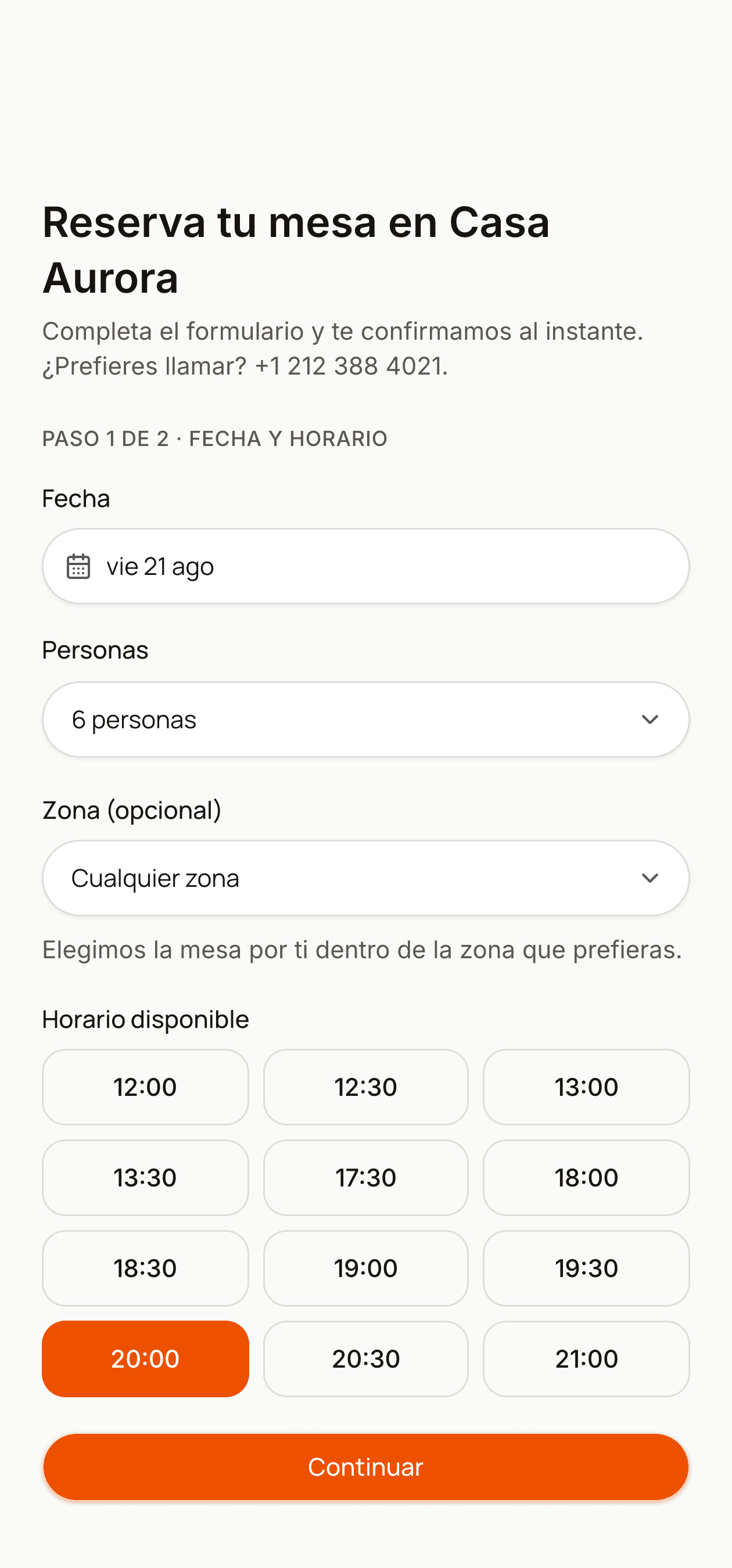
Zones, shape and capacity of every table, plus its state: free, seated or needs cleaning.
Waitlist
Add the guests who could not get a table and notify them by WhatsApp and email as soon as one frees up.
Orders and kitchen
The order lands on the kitchen screen and comes back to the floor the moment a dish is ready.
Register and cash count
Shift with an opening float, split payments, cash movements and a closing count with its difference.
Digital menu
Categories, extras, required choices, allergens and the full history of every price change.
Guests and loyalty
Allergies, preferences, visits, no-shows and points guests redeem for rewards.
Eleven reports with CSV
Occupancy, no-shows, cash, kitchen, staff, menu engineering, loyalty and more.
Product
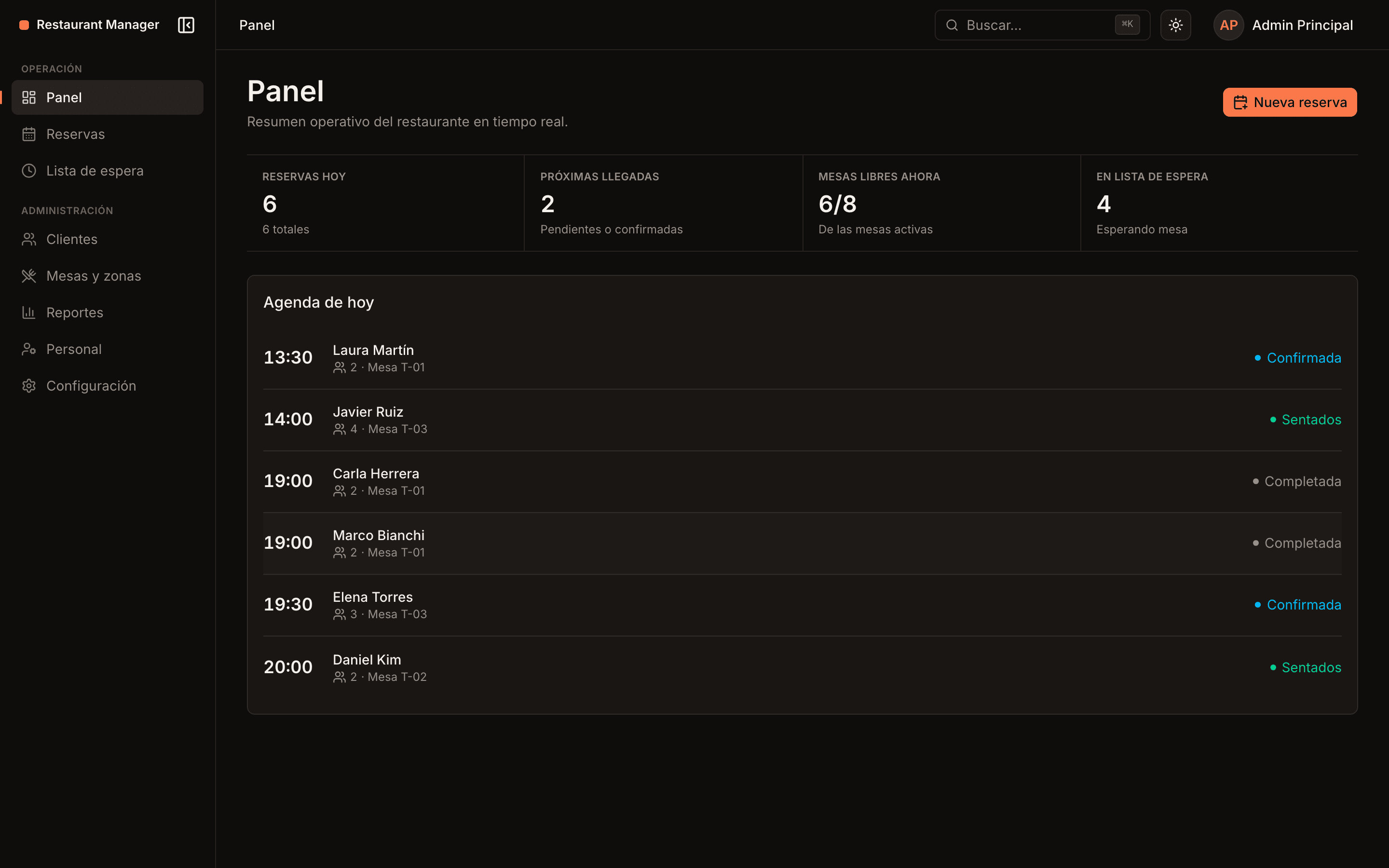
This is what a service looks like on Bookeando
No spreadsheets, no notebook next to the register, no paper tickets. Every screen shows the same information, seen from where it is needed.
Your service, minute by minute
The schedule, the tables and the arrivals on a single screen that updates itself. Your team knows what is going on without asking anyone.
- Floor map by zone, with the real shape of each table and its live status
- How long each table has been seated, so you know when the next one is coming
- Walk-ins seated in two taps, with no made-up reservation
- Table blocks for maintenance or private events, with their reason
- Lunch and dinner shifts, plus an exception calendar for holidays and closures
- Automatic cancellation of no-shows so the table frees up in time
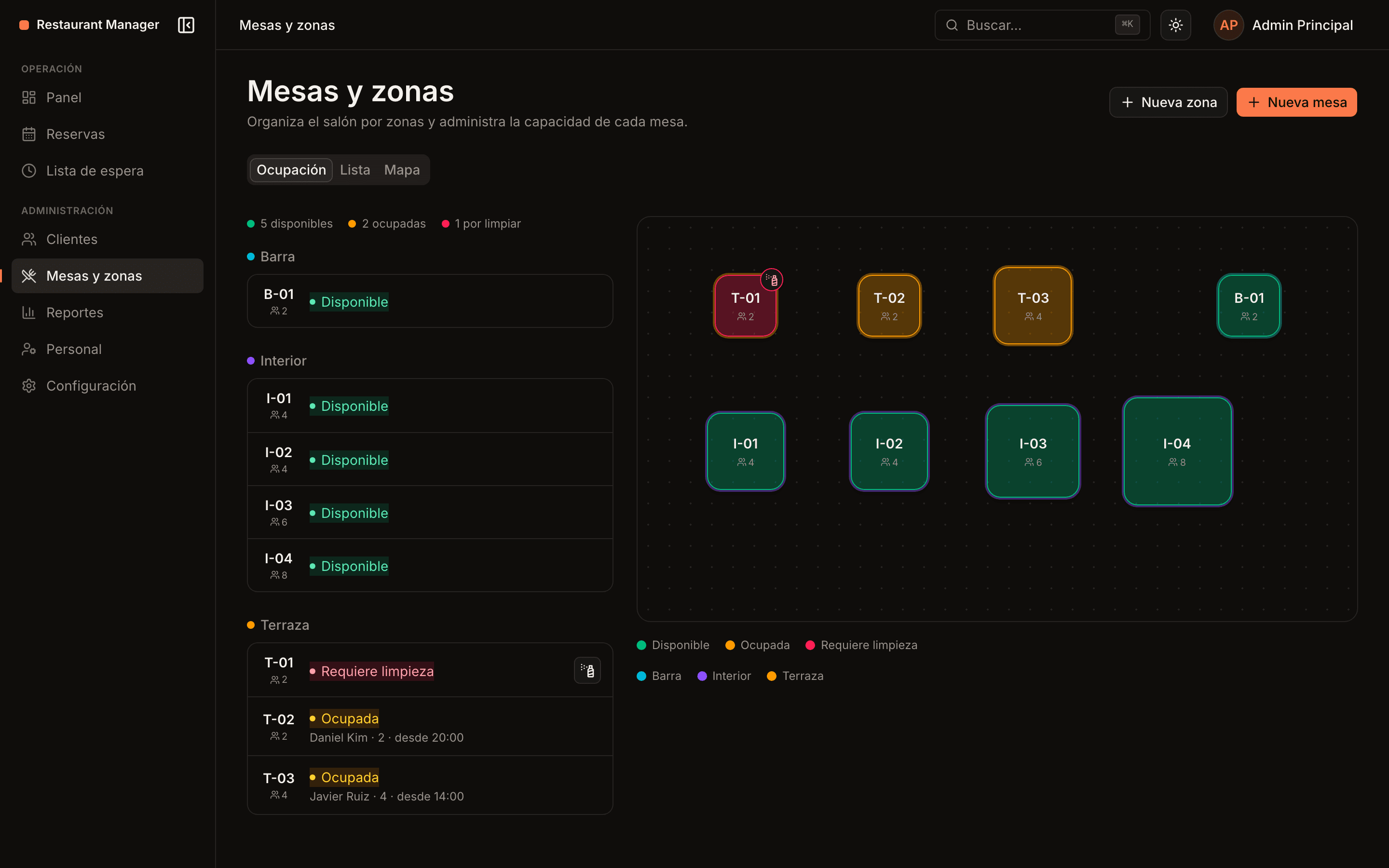
Your booking page, open when you are closed
A link of your own for your website, your Instagram and your Google listing. Guests pick date, time and zone against your real availability, and get their code instantly.
- Availability built from your shifts, your service length and the gap between seatings
- The guest picks the zone; the system picks the table
- Instant confirmation with a booking code, no calls and no waiting
- Your own terms and conditions, accepted at booking time
- Explicit consent before you write to them on WhatsApp
- A clean design built for mobile, where almost every booking happens
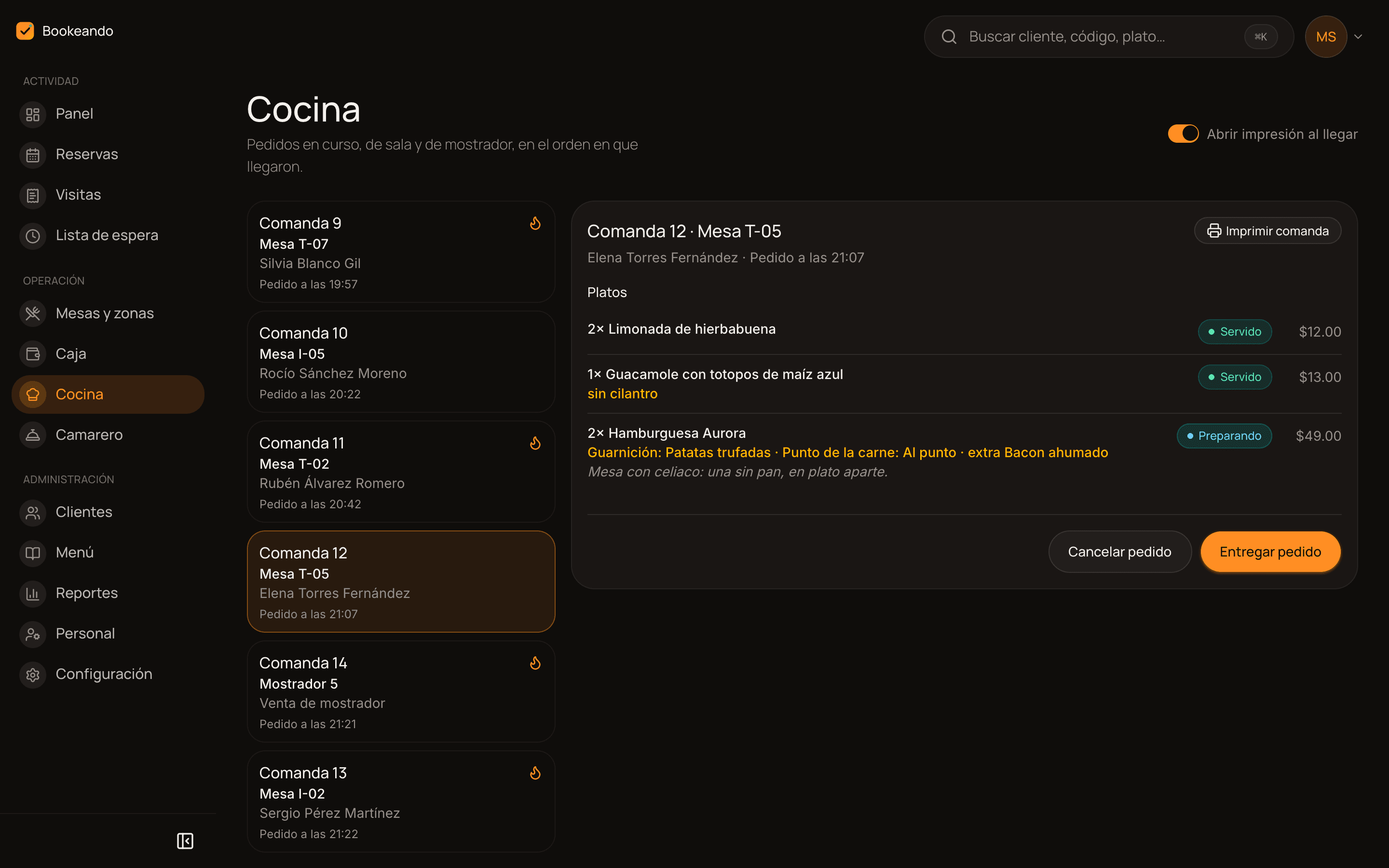
From the notepad to the pass, without shouting
The server takes the order on a phone, the kitchen sees it arrive numbered, and the floor knows when to pick it up. Same order all the way, never typed twice.
- Order tickets numbered daily, from the floor or the counter
- Status dish by dish: pending, cooking, ready and served
- Extras, ingredients removed and required choices, each with its surcharge
- Allergy notes and special requests, visible at the pass
- Ticket printing on arrival, for kitchens that work with a printer
- Voided dishes with a reason, which later explain your waste report
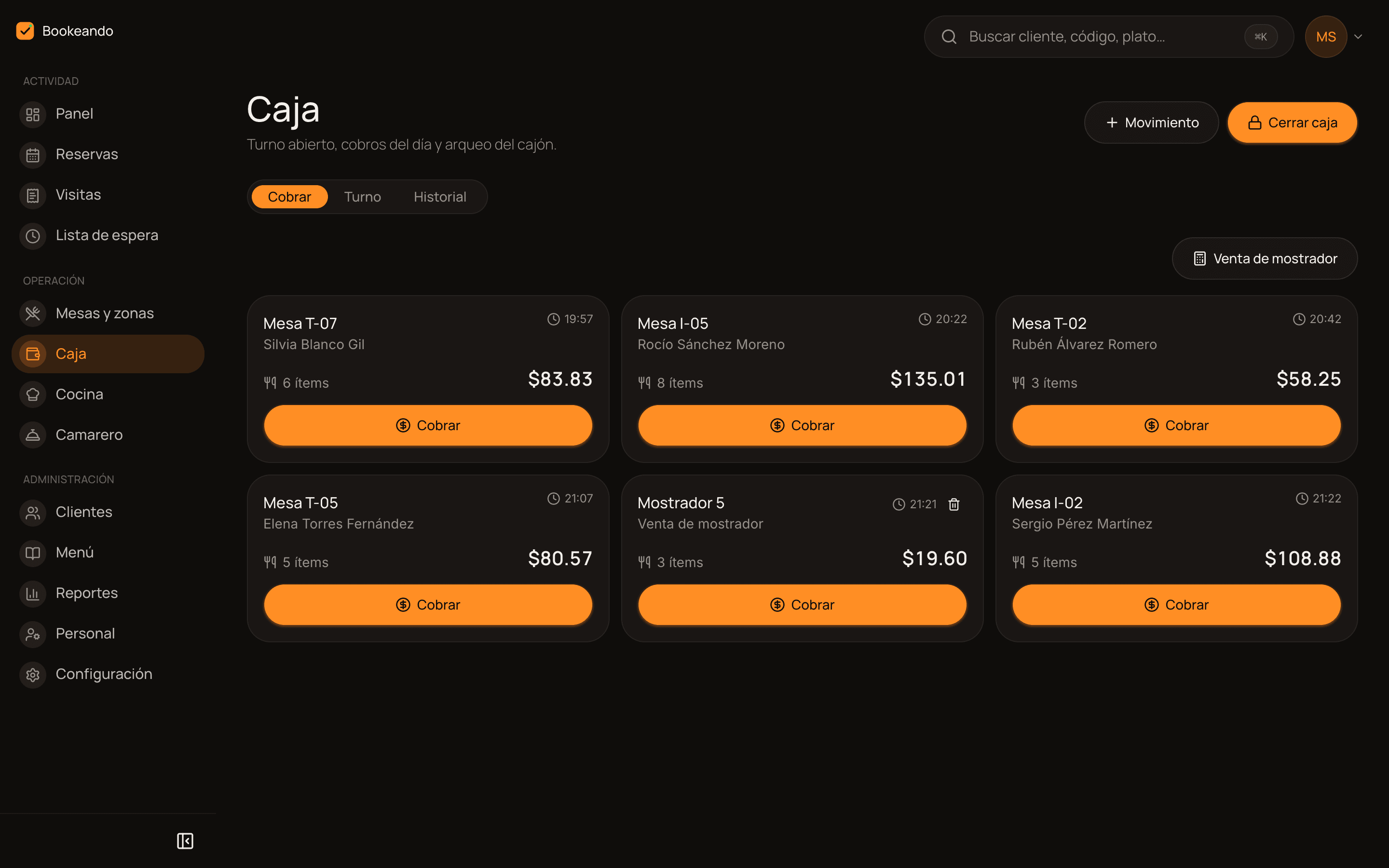
The day closes and it actually balances
Every payment belongs to the cash shift that was open at the time. When you close, the count compares what should be in the drawer with what you actually counted.
- Shift with an opening float, opened and closed by a named person
- Table checks and counter sales settled from the same screen
- Split payments across methods: cash, card and any you add yourself
- Discount codes by percentage or amount, with expiry and minimum check
- Cash in and out with a reason, so any difference has an explanation
- Receipts with your legal header, your tax and your currency
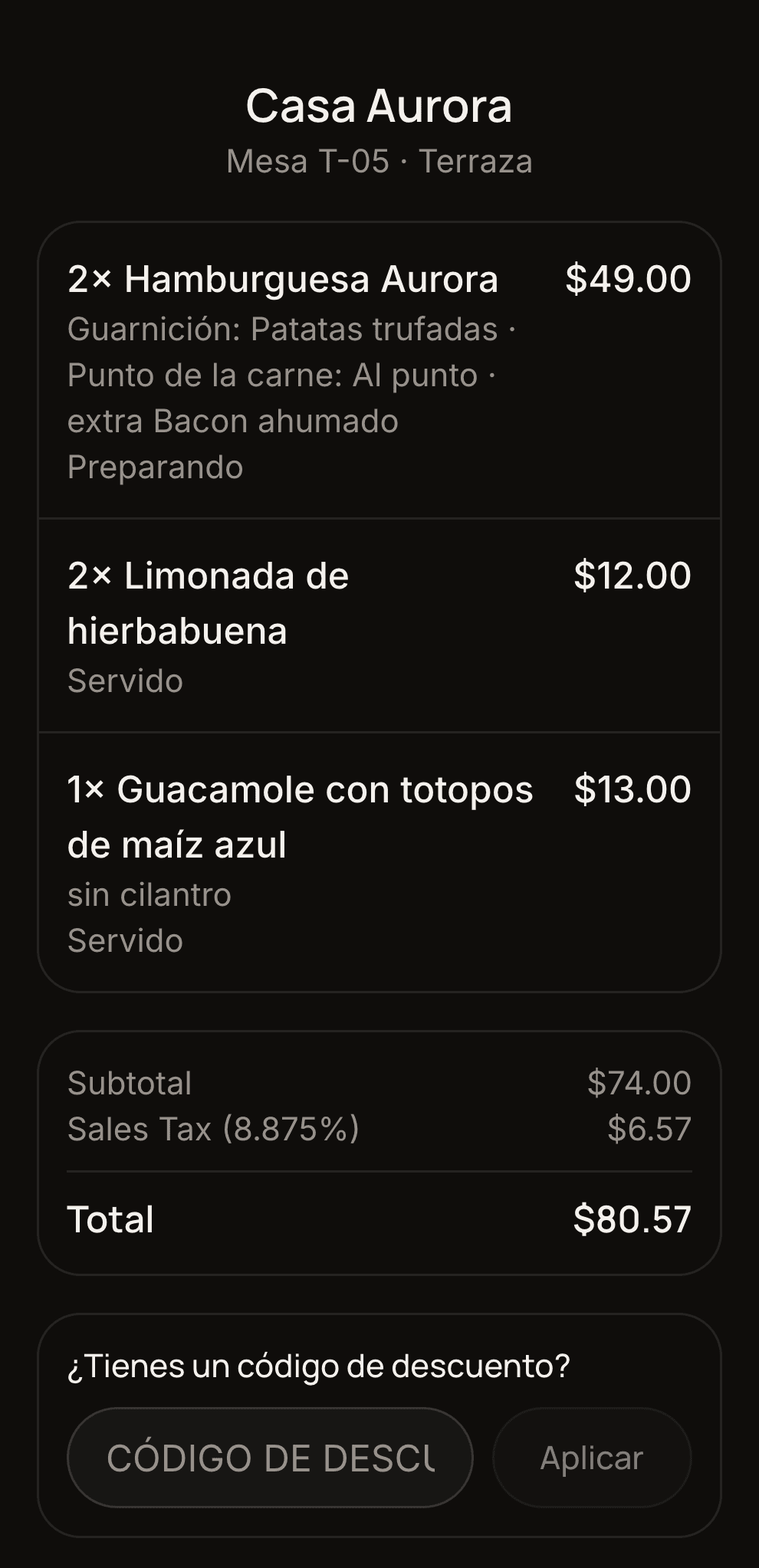
The check, on your guest's phone
Every table has its own QR code. Whoever scans it sees the live check, applies their discount code and identifies themselves to earn points, with nothing to install.
- The live check, with what has been served and what is still in the kitchen
- Extras and choices broken down, with taxes and total always up to date
- Discount codes the guest applies before asking for the check
- Guests identify themselves by phone and earn their points on payment
- Digital menu with categories, allergens and per-dish availability
- The QR can be regenerated whenever you want: the old link simply dies
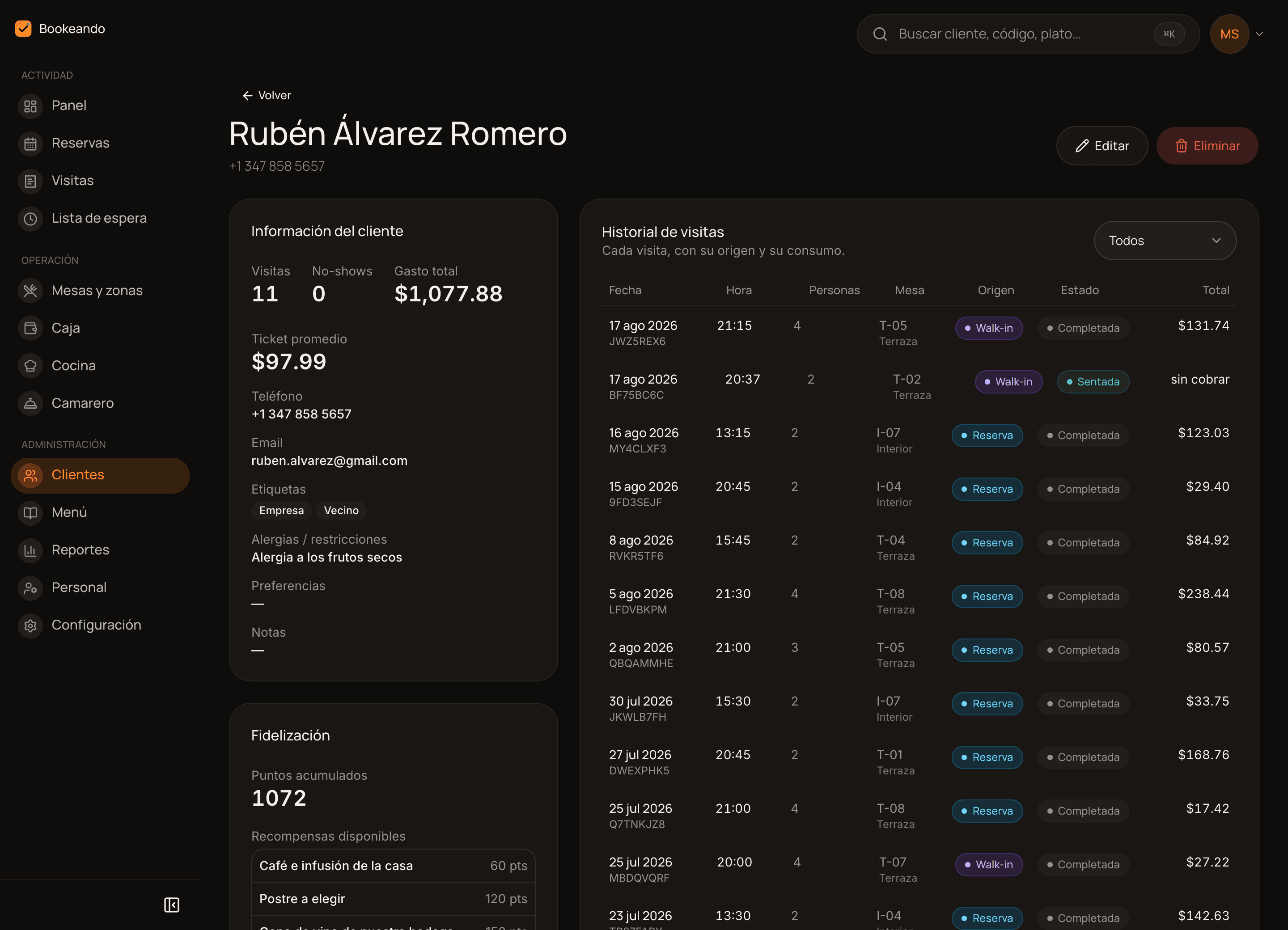
Your regulars, recognised at the door
Every guest has a profile: what they like, what they cannot eat, how many times they came and how many times they did not. Plus a points programme that runs itself.
- Allergies, preferences, notes and tags to segment your guests
- Visits and no-shows counted automatically, with no tally to keep
- Full history of every reservation and every check
- Points earned automatically from what they spend, always balanced
- A catalogue of redeemable rewards that you define
- A points summary emailed when the check is closed
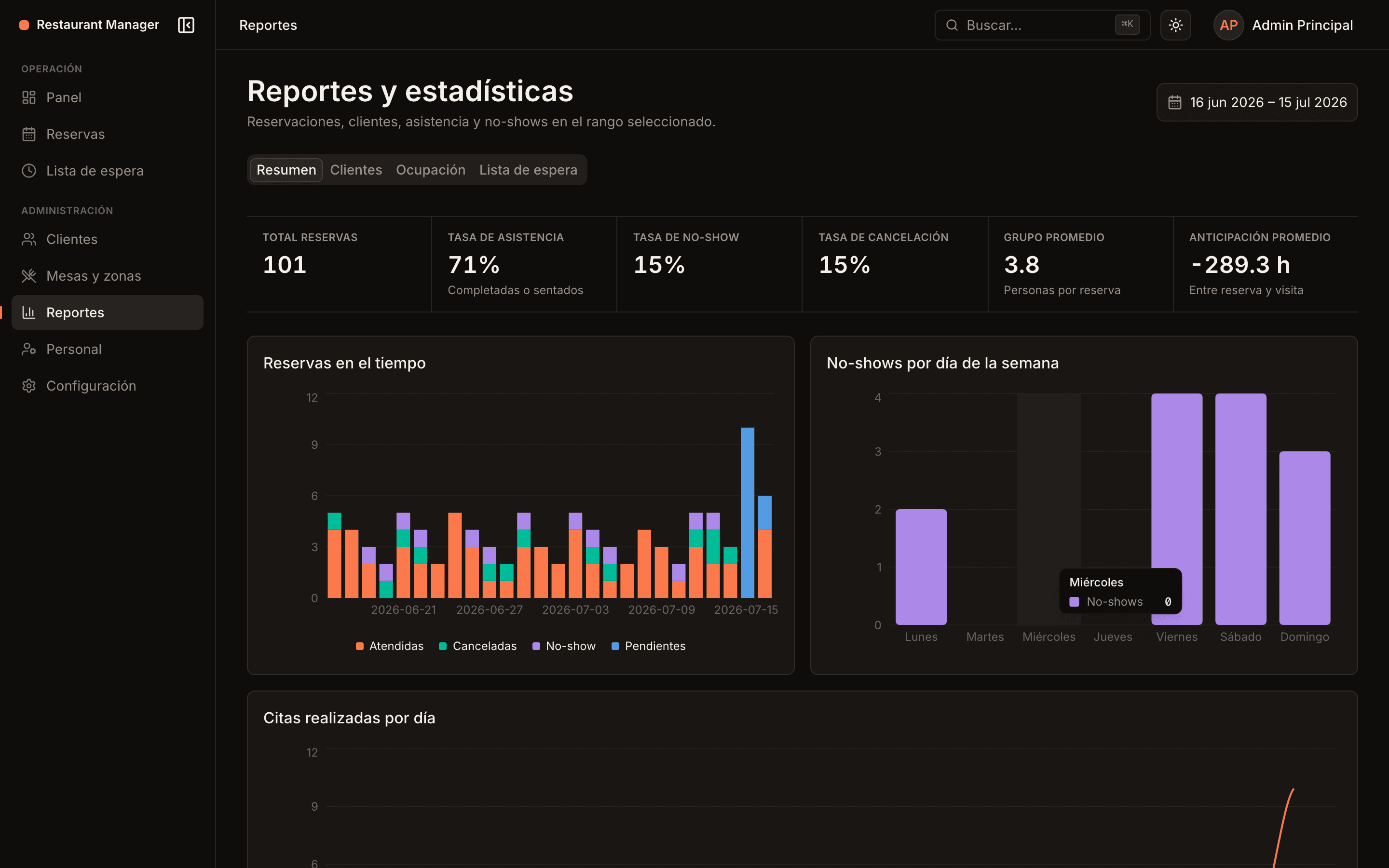
Decisions from data, not from memory
Eleven reports built on the data you already generate every night. Plus a summary of yesterday's service in your inbox first thing in the morning.
- Reservations, visits, occupancy, no-shows and average booking lead time
- Cash: sales by payment method, differences and drawer movements
- Kitchen: preparation times, voided dishes and the reason behind each one
- Menu engineering: what sells, what earns and what is just taking up space
- Staff: who settled the checks and who moved the orders along
- Every report exportable to CSV, plus the daily summary emailed at 8:00
Confirmations and reminders that send themselves
Bookeando writes to your guests at every step of their reservation and alerts your team when something happens during service. These are automatic notifications: the exact information, at the exact moment, with nobody having to type them. If you also want someone to reply and take bookings for you, that is the AI agent on the Business plan.
Instant confirmation
As soon as the booking is created, the guest gets their code, the date, the time, the zone and how to get there.
A reminder with buttons
Before the service a WhatsApp message arrives with two buttons: confirm attendance or cancel. If they cancel, the table frees up in time.
Changes and cancellations
If you move the booking or the guest cancels it, the notice goes out on its own through whichever channels you have on.
Waitlist alerts
When a table frees up, whoever is waiting gets the alert by WhatsApp and email at the same time.
Push alerts for your team
The kitchen knows an order came in and the floor knows a dish is ready, even with the phone in their pocket.
Every channel switched on separately
You decide what goes out on WhatsApp and what goes by email, notice by notice. WhatsApp only reaches guests who opted in when booking.
Bookeando
Casa Aurora notifications
Meta-approved templates, carrying your restaurant's name, address and phone in every notice.
Casa Aurora
online
The booking lands in the panel right away, with its table assigned, like any other.
A host that answers at eleven at night
On top of the automatic notifications, the Business plan lets you switch on an AI agent that does hold conversations with your guests over WhatsApp: it checks your real availability, creates the booking and answers the usual questions, at any hour.
Books while you are closing the register
The guest writes, the agent looks at the gaps left in your schedule and confirms the table with its code. No missed calls, no messages waiting until tomorrow.
Changes and cancels without the floor team
Moving a booking to another time or calling it off is settled in the same conversation, and the table frees up in the panel straight away.
Answers what people ask a hundred times
Opening hours, how to get there, whether there is a terrace, whether you have gluten-free options, whether kids are welcome. If it is in your settings and your menu, it answers.
Knows when to call a human
When the request goes beyond what it can settle, a private event, a delicate allergy, a complaint, it hands the conversation to your team with everything that was said.
Sounds like your house, not like a robot
Tone, manners and what it may or may not offer are tuned restaurant by restaurant before it goes live.
Booking guarantee
Casa Aurora
Never let a no-show cost you a table
For the bookings that hurt most, a large party on a Friday night, Bookeando asks for a card as a guarantee. If the guest shows up, nothing is charged. If they do not, you collect the deposit you set.
You decide when it applies
Switch it on by party size and by time window. For example, from 6 guests upwards, Thursday to Saturday at dinner.
The card is saved, nothing is charged
The guest enters it while booking and it is stored as a guarantee. It is only charged if the reservation does not show up.
You set the amount, per guest
Set the deposit per person and the system works out the total for that booking. A table of 6 at $15 each comes to $90.
Half-finished bookings do not block your table
If nobody completes the card, the booking expires after the hours you choose and the table is free again.
The money goes straight to your account
Stripe processes the charge in your restaurant's own connected account. Bookeando never stores card data and never holds your money.
Team and permissions
Everyone gets their own screen, and nothing else
The same system shows a different panel depending on who logs in. Nobody has to learn what they are never going to use.
The whole panel
Settings, staff, menu, register and reports. They decide prices, opening hours and who gets access.
Schedule, tables and payments
Today's reservations, the floor map, the waitlist, walk-ins and the checks waiting to be settled.
Orders and service
Takes the order on a phone and sees which dishes are ready in the kitchen to carry them out.
The pass, and only the pass
The ticket queue in the order it arrived, with its notes, its printing and its timings.
With two-step verification by email for the accounts that need it, and push alerts on every authorised device.
How it works
From setup to your first service, in days
No new hardware, no endless learning curve.
We set up your restaurant
Zones, tables and floor plan, shifts and exceptions, menu with extras and prices, payment methods and taxes. You review, we adjust.
We connect your channels
Your booking page for the website, Instagram and Google, WhatsApp and email notifications, and Stripe if you want card guarantees.
We train your team
Each role on its own screen, in one session. Any browser will do: the computer at the door, the tablet at the pass or a server's phone.
You review and adjust
A daily summary at 8:00 and weekly reports to fine-tune shifts, menu and staffing without guessing.
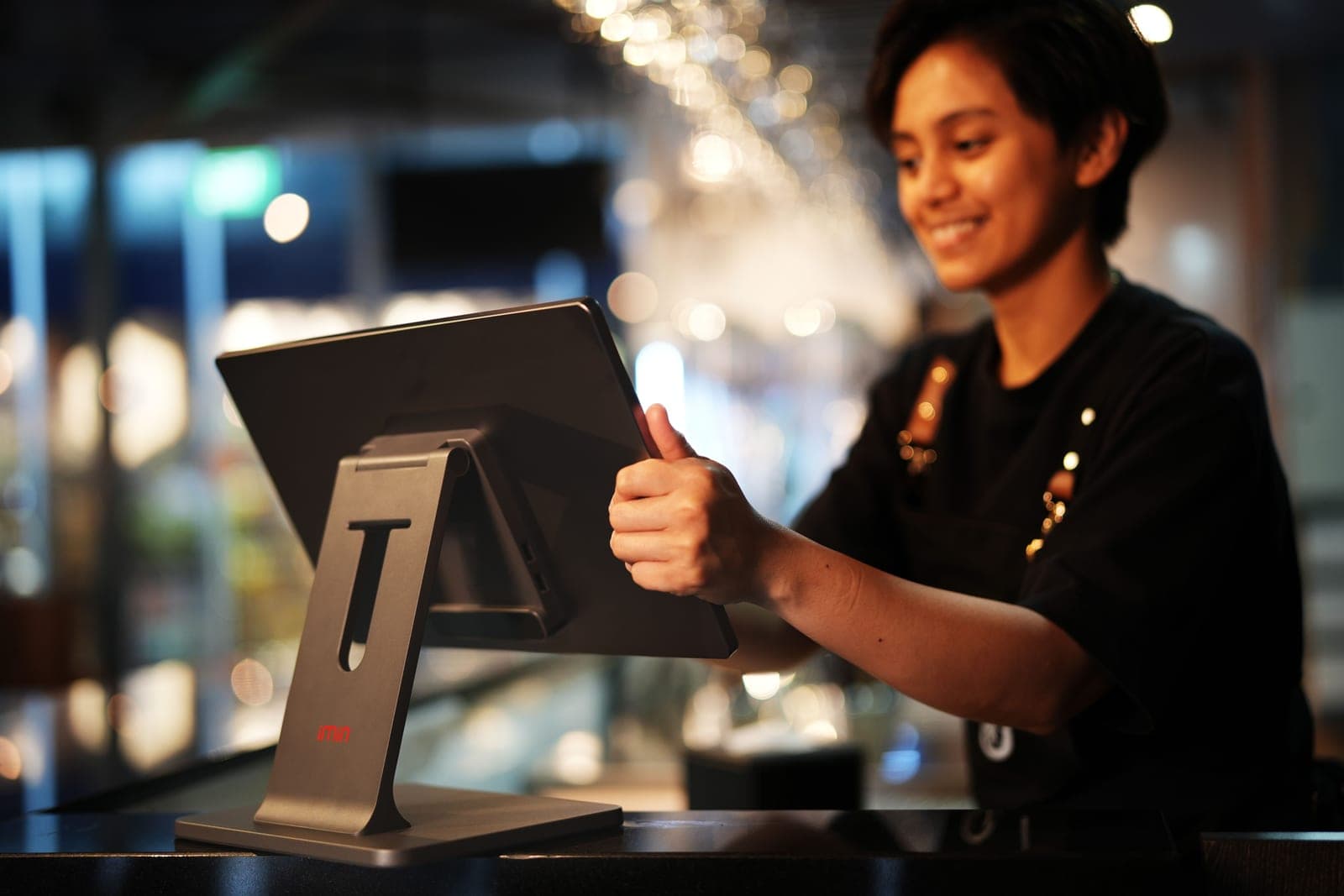
Every table, every night
Real hosts running the real service.
Real teams, real service
Behind every confirmed table, someone is taking care of your guests
Bookeando is not here to replace your floor team. It is here to give them a single screen, less chaos at the door and more time to welcome every guest properly.
Pricing
A plan for every stage of your restaurant
Clear prices, no small print. Change plan whenever you need to.
Starter
billed $2,388 a year
For the restaurant that wants to stop running service by hand.
- Reservations, floor map and waitlist
- Online booking page with instant confirmation
- Shifts and an exception calendar
- Orders, kitchen display and server app
- Register with cash counts, discounts and your own receipt
- Digital menu with extras and a QR per table
- Email notifications for guests
- Migration of your current reservations and guests
- Up to 2 users
- Email support
Pro
billed $2,988 a year
For teams that want data, loyal guests and zero no-shows.
- Everything in Starter
- Up to 5 users with roles and two-step verification
- Full guest profile and history
- Points-based loyalty with a rewards catalogue
- Card guarantee against no-shows (Stripe)
- 100 WhatsApp messages a month
- Multiple zones on the floor map
- All eleven reports, exportable to CSV
- Priority support
Business
based on venues and volume
For restaurant groups and high-volume venues.
- Everything in Pro
- Customer service AI agent over WhatsApp
- Unlimited users and WhatsApp messages
- One panel per venue, with each venue's data kept apart
- Onboarding and training for every team
- Limits and features tailored to how you operate
- A dedicated account manager
The price you see is the price you pay
No booking commissions, no charge per guest seated, and no modules that you switch on today and find on next month's invoice. Your plan fee is everything you pay for Bookeando.
in commission a month. At 400 guests, a platform charging per cover would add $400 to $1,600 on top of its fee.
$0 per booking and per guest
Whether 100 or 1,000 guests come this month, your fee does not move. The opposite of platforms charging $1 to $4 for every cover that sits down.
The whole system, inside the plan
Orders, kitchen, register, menu, guests and reports are not separate modules: they come in the price from the smallest plan up.
WhatsApp notices stop, they do not bill
If you run out of the messages included in your month, we stop sending them and let you know. No usage charge you never approved.
Setup and migration included
Configuring your restaurant and bringing over your reservations and guests from the old system costs nothing extra, on any of the three plans.
No-show guarantees are charged into your restaurant's own Stripe account: you pay Stripe's usual fee and none of ours.
Use cases
How other restaurants use Bookeando
“We used to keep the schedule in a notebook and the orders on paper. Now the booking, the order and the payment are the same record.”
Floor manager
Market-cuisine restaurant, 60 covers
“The real-time floor map changed how we run the dining room on weekends. No more double bookings, no more surprises.”
Operations manager
Restaurant group, 3 venues
“Reminders with a confirm button cut our no-shows almost in half in the first month.”
Owner
Specialty restaurant, city centre
Frequently asked questions
Everything people usually ask us
In most cases yes. The server takes the order, the kitchen prepares it and the register settles it with your payment methods, your discounts, your cash count and your receipt. If you would rather keep your current POS, you can use only the reservations and floor side.
No. Bookeando runs in any browser, on a computer, tablet or phone, and it can be installed as an app to receive alerts. If you already have a device at the door and another at the pass, that is enough.
Yes. A walk-in is seated straight from the floor map and recorded as another visit, with its own check and guest profile. And anyone who cannot get a table joins the waitlist and is alerted the moment one frees up.
Eleven: reservations, visits, cash, kitchen, staff, menu engineering, loyalty, voids and discounts, guests, occupancy and waitlist. All of them with a date range and exportable to CSV on the Pro and Business plans, plus the daily summary emailed at 8:00.
Yes. Each venue has its own panel, menu, staff and separate data, and the Business plan includes rollout and training for every team with a dedicated account manager.
Stop taping systems together
Book a 20-minute demo and we will show you your restaurant running on Bookeando, with your zones, your tables and your menu.